 Aquanode Docs
Versions
Every save is a numbered version in the setup's lineage. Resuming one brings that exact state back on a new machine.
A setup keeps a lineage of saves. Each save is a numbered version: v1, v2, v3, and so on. Newest first. Resuming one brings that exact state back on a new machine.
Saving a version
From the setup, click Save a version. From the terminal:
aq save <name|id>A version records the disk as it stands, so the next launch starts from there rather than from the original image. You can attach a note to a version to say what changed, which is worth doing once you have more than two.
Saving does not stop the machine
Saving a version and pausing a setup are different actions. aq save takes a
version and leaves the box running. aq pause takes a version and then
releases the machine. See Pause and resume.
What the Versions tab shows
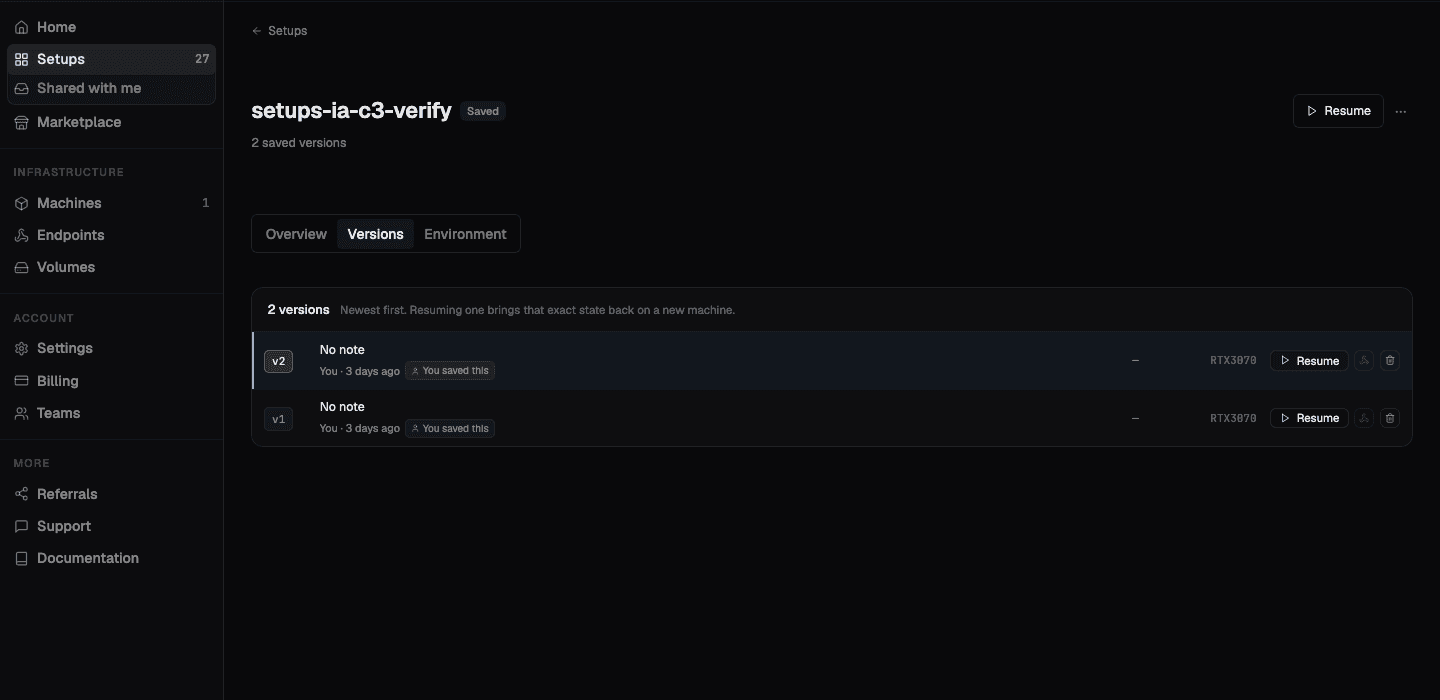
Each row in the lineage carries:
- The version number
- Its note, if you left one
- Who saved it and when
- The GPU model it was saved from
- Resume, which brings that version back on a fresh machine
- Share and delete actions
Resuming a specific version
Resuming is not limited to the newest save. Pick any version in the lineage and resume that one, and you get that exact state on a new box. The card it originally ran on does not have to be free, and does not even have to be the same model, as long as the new card fits.
Your other saved versions are not touched by this. Resuming never overwrites the lineage, it reads from it.
From the terminal
aq save <name|id>            # save the current state as the next version
aq setups                    # list the setups you own
aq status <name|id>          # status, HTTPS URL, and credentials
aq edit-version <id>         # change a version's label, description, or visibility
aq ls --all                  # list machines, including closed ones, to find an id
aq deploy --snapshot <id>    # restore a specific save onto a freshly rented box
--snapshot takes a numeric deployment id, or ext-<backupId> for a snapshot the
standalone CLI took. It is not the vN version number.
Sharing one version
A version is the unit you share. You do not share a whole setup, you share a save of it, and the person who opens the link gets their own copy. See Sharing and forking.
What versions cost
You pay only to hold what a setup saved, at $0.02/GiB per month. Syncing while you work is free, and a paused setup rents no machine at all. Deleting a version you no longer need is the way to bring that number down.