 Aquanode Docs
Launching a setup
Pick a starting point, pick a machine or let us pick, and launch. Everything on that screen can change later.
Launch from Setups in the console, then New setup. Everything on that screen can change later. The setup is yours from the first launch, not locked in by the choices you make here.
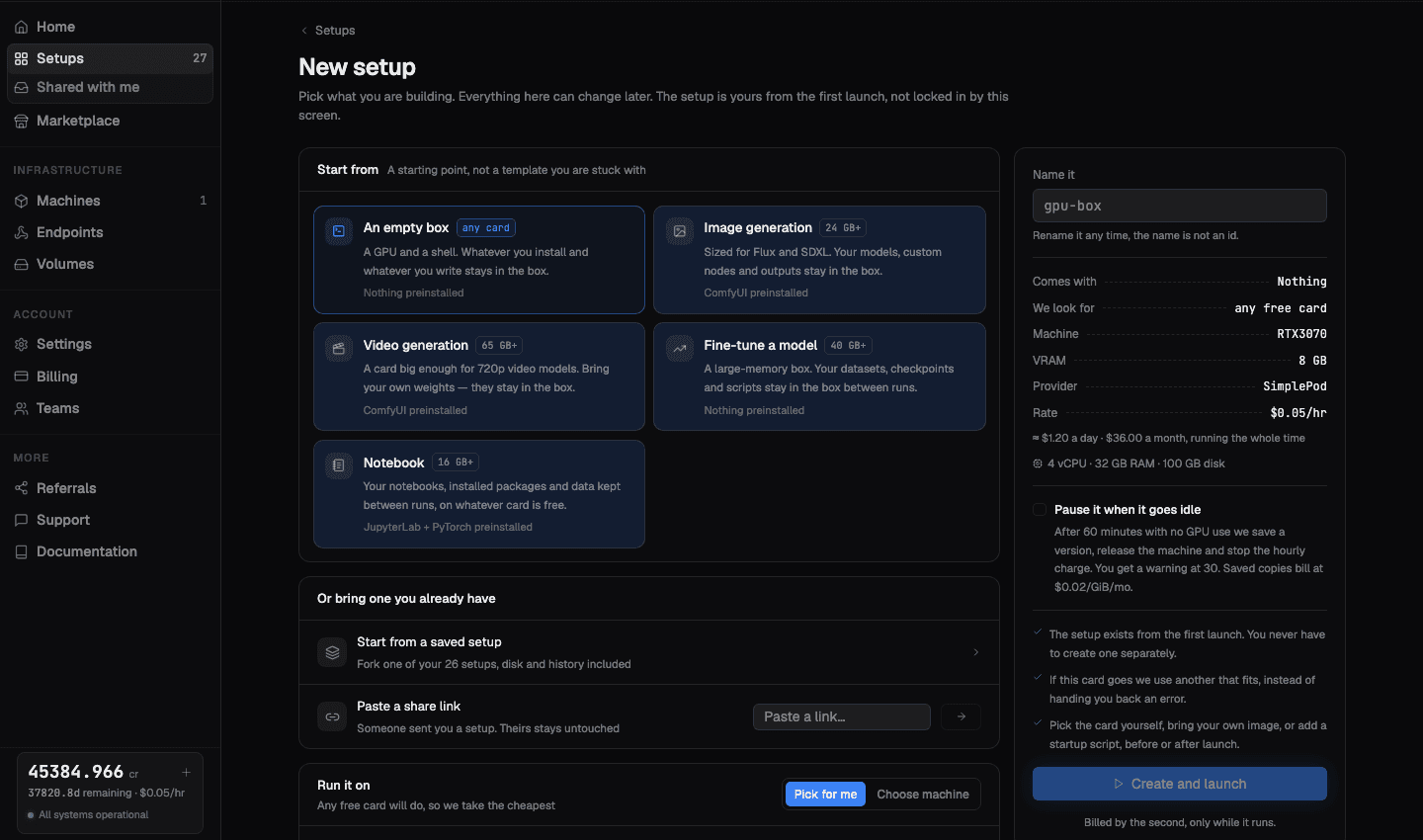
Start from
Five starting points. Each is a starting point, not a template you are stuck with.
| Starting point | VRAM it looks for | What is preinstalled |
|---|---|---|
| An empty box | Any card | Nothing. A GPU and a shell. Whatever you install and whatever you write stays in the box. |
| Notebook | 16 GB and up | JupyterLab and PyTorch |
| Image generation | 24 GB and up | ComfyUI, sized for Flux and SDXL |
| Fine-tune a model | 40 GB and up | Nothing. A large-memory box for datasets, checkpoints, and scripts. |
| Video generation | 65 GB and up | ComfyUI, on a card big enough for 720p video models |
In every case your models, custom nodes, outputs, datasets, and checkpoints stay in the box between runs.
Or bring one you already have
- Start from a saved setup. Fork one of your own setups, disk and history included.
- Paste a share link. Someone sent you a setup. Theirs stays untouched, you get your own copy. See Sharing and forking.
- Import a box you rent elsewhere. Capture a machine you already run at another
provider into a new setup with
aq import.
Picking the machine
Pick for me
Any free card will do, so we take the cheapest one that fits your starting point's VRAM floor. This is the default and it is the right answer most of the time.
Choose machine
Pick the card yourself. One screen, no wizard. You get the live marketplace, filtered to what is actually free right now.
You can also restrict to data-centre GPUs only if you do not want community capacity.
If that card disappears, you do not get an error
Capacity at a provider is not reserved until the box comes up. If the card you picked goes while we are claiming it, we use another one that fits, instead of handing you back a failure. Nothing is started and nothing is charged until a box actually comes up.
What the panel tells you before you commit
The right-hand panel prices the launch before anything is rented:
- Comes with, the preinstalled software for the starting point you chose
- We look for, the card requirement being matched
- Machine, VRAM, Provider, and the hourly Rate
- A running-the-whole-time estimate, both per day and per month
- The vCPU, RAM, and disk you get
Billing is by the second and only while the machine runs.
Auto-pause at launch
Tick Pause it when it goes idle and the setup stops charging on its own when you walk away. After 60 minutes with no GPU use, Aquanode saves a version, releases the machine, and stops the hourly charge. You get a warning at 30 minutes. Saved copies bill at $0.02/GiB per month.
You can change this later from the setup, so leaving it off now costs you nothing. Details in Pause and resume.
Doing it from the terminal
aq up                          # cheapest card that fits, ComfyUI by default
aq up --jupyter                # Torch and Jupyter instead
aq up --gpu "RTX 4090"         # filter to a GPU model
aq up --gpus 2                 # ask for more than one card
aq up --max-price 0.50         # cap the hourly rate
aq up --provider massecompute  # pin to one provider
aq up --auto-pause             # turn on idle auto-pause
Full flag list in the command reference.