 Aquanode Docs
API Keys
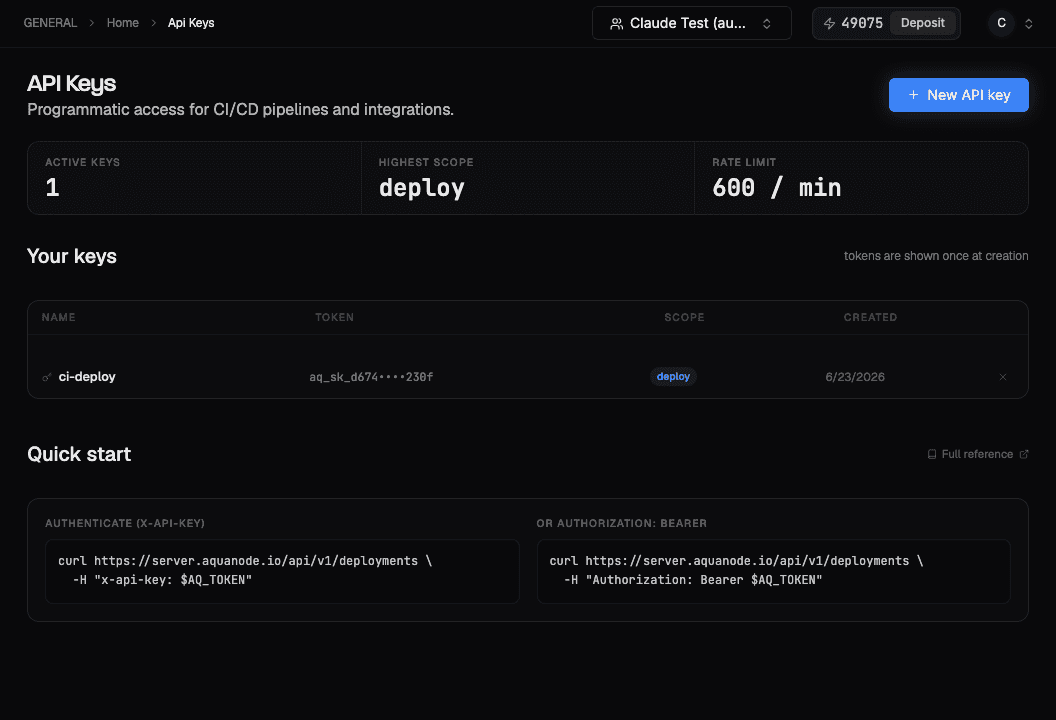
Create API keys for programmatic access to Aquanode. Deploy and manage machines from CI/CD pipelines and your own integrations.
API keys give you programmatic access to Aquanode outside the console (for CI/CD pipelines and custom integrations). Keys are prefixed aq_sk_ and scoped to your team.
What you can do
- Create named API keys for CI/CD and integrations
- Authenticate API requests without a browser session
- Revoke a key instantly if it's no longer needed or may be exposed
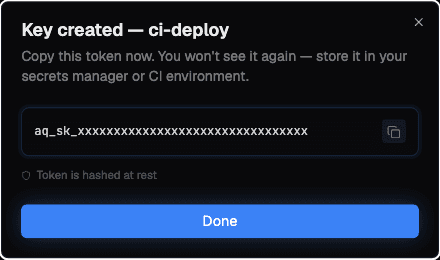
Tokens are shown once
The full token is displayed only once, at creation time. Copy it immediately and store it somewhere safe (a secret manager or your CI's encrypted secrets). If you lose it, revoke the key and create a new one.
Create an API key
Generate the key
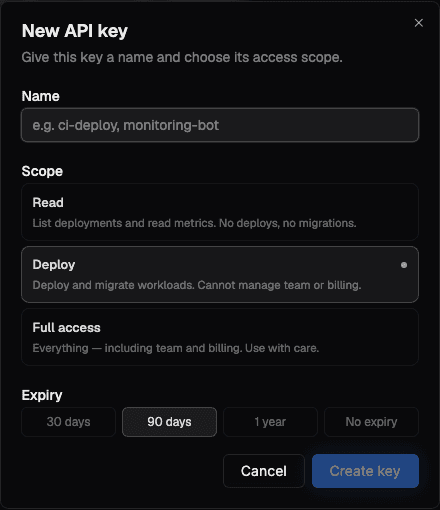
- Go to API Keys in your account
- Click + New API key
- Give it a name (e.g.
ci-deploy,monitoring-bot) - Choose a scope and an expiry, then click Create key
- Copy the generated
aq_sk_...token immediately and store it securely
Choose a scope and expiry
Pick the least-privilege scope your integration needs:
| Scope | Grants |
|---|---|
| Read | List deployments and read metrics. No deploys, no migrations. |
| Deploy | Deploy and migrate machines. Cannot manage team or billing. |
| Full access | Everything, including team and billing. Use with care. |
Set an expiry to limit a key's lifetime: 30 days, 90 days, 1 year, or No expiry.
Use it with the API
Pass the key on every request, using either header:
# Option A: x-api-key
curl https://server.aquanode.io/api/v1/deployments \
  -H "x-api-key: aq_sk_xxxxxxxxxxxxxxxxxxxx"

# Option B: Authorization: Bearer
curl https://server.aquanode.io/api/v1/deployments \
  -H "Authorization: Bearer aq_sk_xxxxxxxxxxxxxxxxxxxx"
Revoking a key
From the API Keys page, delete any key to revoke it immediately. Requests made with a revoked key are rejected. Revoke and re-create a key any time you suspect it has been exposed.
Rate limits
API requests are rate-limited (currently 600 requests/minute). If you need a higher limit, get in touch via Feedback.
SSH Keys
Add and manage the SSH keys used to access your machines. Every machine deployment requires a registered SSH key. Add yours once and reuse it across machines.
Teams
Collaborate on Aquanode. Create teams, invite members with a shareable link, and manage roles so your whole team can share deployments and balance.